Blog · Infrastructure
How to set up a Mac mini cluster
A practical guide to Mac mini cluster setup: node roles, repeatable provisioning with Brewfiles and Ansible, SSH keys, runner labels, monitoring and staged updates.
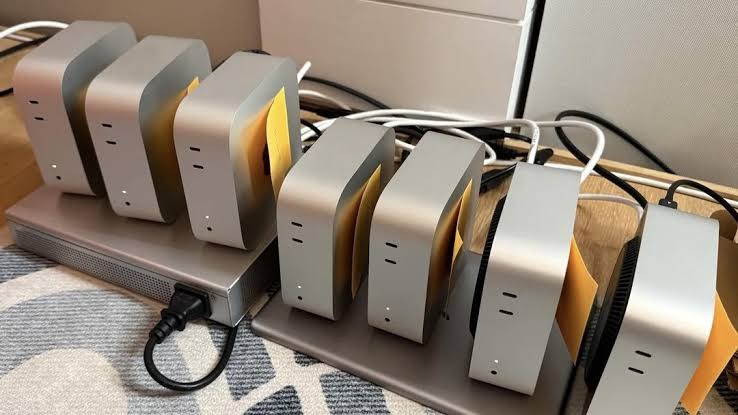
A Mac mini cluster is only as good as its consistency. This guide shows how to set up a Mac mini cluster that you can rebuild, scale and update without surprises.
Plan node roles before you provision anything
Start with a short list of what the machines will actually do. Most small clusters end up with two or three roles, and writing them down early saves a lot of rework later.
- Build nodes run CI jobs: Xcode builds, unit tests, UI tests on simulators, archiving and signing. These need disk space for DerivedData and simulator runtimes.
- Utility node holds shared services: a package cache, an artifact store, a metrics collector. One modest machine is usually enough.
- Inference or batch nodes run longer jobs such as local LLM serving or media processing. These care most about memory.
Match hardware to role. A Mac mini M4 or M6 with 16GB is a sensible build node for many iOS projects. Larger apps, parallel simulators and heavier Swift compiles benefit from the 24GB Mac mini M6 or M5 Pro. If one role needs far more memory, such as 30B or 70B-class models, that is a Mac Studio cluster question rather than a Mac mini one.
Keep each role homogeneous where you can. Identical nodes make scheduling simple: any job can run on any machine with the right label.
Name nodes and set up SSH access
Pick a naming scheme that tells you the role and the index, and set all three macOS names so tools agree:
sudo scutil --set ComputerName  mac-ci-01
sudo scutil --set HostName      mac-ci-01
sudo scutil --set LocalHostName mac-ci-01
Next, give your admin workstation key-based access to every node. Generate a dedicated key for cluster administration rather than reusing a personal one:
ssh-keygen -t ed25519 -f ~/.ssh/mac-cluster -C "cluster-admin"
ssh-copy-id -i ~/.ssh/mac-cluster.pub admin@mac-ci-01
Then add entries to ~/.ssh/config so every tool, including Ansible, uses the same settings:
Host mac-ci-*
  User admin
  IdentityFile ~/.ssh/mac-cluster
  ServerAliveInterval 30
Once keys work, disable password authentication for SSH in /etc/ssh/sshd_config (set PasswordAuthentication no) and keep at least one other access method, such as Screen Sharing, as a fallback. If you are new to remote access on macOS, our guide on how to access a remote Mac covers the options.
Provision every node the same way
The single biggest source of flaky builds in a Mac mini cluster is drift: one node has a different Xcode, Ruby or CocoaPods version. Fix this with declarative provisioning that you can rerun at any time.
Layer 1: a Brewfile
Homebrew Bundle installs everything listed in a Brewfile and skips what is already present. Commit it to a repository that all nodes can read:
# Brewfile
brew "git"
brew "jq"
brew "xcodes"
brew "swiftlint"
brew "node_exporter"
cask "temurin"
brew bundle --file=./Brewfile
brew bundle check --file=./Brewfilebrew bundle check is useful in CI health checks: it exits non-zero when a node has drifted.
Layer 2: Xcode and system settings
Xcode is not a normal Homebrew package. Tools such as xcodes can install a pinned version, and you then select it explicitly:
xcodes install 16.4
sudo xcode-select -s /Applications/Xcode-16.4.app
sudo xcodebuild -license accept
xcodebuild -runFirstLaunch
Put power and sleep settings in the same script so no node sleeps mid-build:
sudo pmset -a sleep 0 displaysleep 0 disksleep 0Layer 3: Ansible over SSH
Once you have more than two or three machines, run the whole thing from one place. Ansible works well on macOS because it only needs SSH and Python on the target. A minimal inventory and playbook:
# inventory.ini
[build]
mac-ci-01
mac-ci-02
mac-ci-03

[utility]
mac-util-01
# site.yml
- hosts: all
tasks:
- name: Copy Brewfile
ansible.builtin.copy:
src: Brewfile
dest: /Users/admin/Brewfile
- name: Install packages
ansible.builtin.command: /opt/homebrew/bin/brew bundle --file=/Users/admin/Brewfile
register: bundle
changed_when: "'Installing' in bundle.stdout"ansible-playbook -i inventory.ini site.yml --limit buildThe --limit flag matters later: it is how you roll changes out to a subset of nodes.
Share caches without sharing state
Caches speed up a cluster a lot, but shared mutable state causes the hardest bugs. A good rule: share downloads, keep build outputs local.
- Keep DerivedData local to each node. Sharing it over the network is slow and prone to corruption.
- Cache dependencies centrally. Point Swift Package Manager, CocoaPods, npm or Gradle at a caching proxy on the utility node, or use your CI system's built-in cache keyed on lockfiles.
- Use macOS Content Caching (System Settings, General, Sharing) on the utility node so other Macs on the same network can fetch Apple software updates from it.
- Compiler caches such as ccache or sccache help with C, C++ and Rust code, with a shared backend if your network allows it.
Whether nodes can reach each other on a private network depends on how they are hosted. If you rent with Hatmac and need machines to talk to each other, tell us what you need.
Distribute jobs across the cluster
CI runners with labels
For CI, let the CI system do the scheduling. Register one runner per node and use labels to describe capabilities. With GitHub Actions self-hosted runners, for example:
./config.sh --url https://github.com/your-org/your-repo \
  --token YOUR_TOKEN --name mac-ci-01 \
  --labels macos,arm64,xcode-16.4 --unattended
./svc.sh install
./svc.sh start
Workflows then target runs-on: [self-hosted, macos, xcode-16.4]. When you upgrade Xcode, add a new label to upgraded nodes and move workflows over gradually. The same pattern works with GitLab runner tags and Jenkins agent labels. See the official GitHub self-hosted runner docs for details, or our GitHub Actions Mac runner page.
Distributed inference
Splitting one large model across several Macs is possible but still maturing. llama.cpp has an RPC backend and MLX has distributed primitives, and both can spread work across machines. Expect network latency between nodes to limit throughput, and expect to tune things. For most teams, a simpler pattern works better: run one complete model per node and put a load balancer in front, so each request lands on a single machine.
Monitoring basics
You do not need a large stack to start. Track four things per node: disk free, memory pressure, CPU load and whether the runner service is up.
df -h /
memory_pressure | tail -1
uptime
launchctl list | grep actions.runner
For dashboards, node_exporter (installed by the Brewfile above) exposes metrics that Prometheus can scrape from the utility node. Alert on low disk first. Full disks from DerivedData and simulator runtimes cause most CI outages on Macs. A weekly cleanup job helps:
rm -rf ~/Library/Developer/Xcode/DerivedData/*
xcrun simctl delete unavailable
Maintenance: stage updates node by node
Never update every node at once. A staged rollout keeps the cluster serving jobs while you test changes.
- Drain one node. Pause or remove its runner label so no new jobs land on it.
- Update it. List updates first, then install:
softwareupdate -landsudo softwareupdate -i -a -R. Apply Xcode changes through the playbook. - Run a canary job. Trigger a real build and test run on that node only.
- Roll forward. Use
ansible-playbook --limit mac-ci-02and so on, one or two nodes at a time. - Keep a rollback. Leave at least one node on the previous version until the new one has run cleanly for a few days.
Record the macOS and Xcode version of each node in your inventory so anyone can see the state of the cluster at a glance.
Build or rent the hardware
The setup above works the same on your own machines or on rented ones. Renting removes the racking, power and hardware failure work. Every Hatmac machine is a dedicated physical Mac, not a VM, with full admin access, so the provisioning steps here apply unchanged. Mac mini M4 and M6 are available month to month, and longer terms cost less per month; see current pricing. For a broader look at the trade-offs, read rent vs buy a Mac mini.
FAQ
How many nodes does a Mac mini cluster need?
Two is the practical minimum, so one can be drained for updates while the other runs jobs. Add nodes when your CI queue time grows.
Should I use Ansible or shell scripts?
Scripts are fine for two or three machines. Ansible pays off once you need to target subsets of nodes and rerun changes safely.
Can I mix Mac mini models in one cluster?
Yes. Use runner labels to describe memory and chip so heavier jobs land on the larger machines.